Costruisci il commercio alberghiero nel tuo prodotto.
Sezione intitolata “Costruisci il commercio alberghiero nel tuo prodotto.”Commercio alberghiero API-first: ricerca, prenotazione, pagamento, 70 webhook, attribuzione e passaggio AI — con un server MCP ospitato che permette agli agenti di leggere i contratti live, e Booking Engine che gestisce il fulfillment sottostante.
# 1 · connect an agent or coding client
$ claude mcp add wink
https://api.wink.travel/mcp --transport http
→ browser sign-in at iam.wink.travel
✓ connected · OAuth2 + PKCE · no client secret
# 2 · find the operation, read the live contract
api_search "create booking"
→ POST /bookings · wink://api/operation/createBooking
# 3 · create the booking, take payment
$ wink bookings create --rate rp_8421
201 · #WK-2X9F · paid via Wink
# 4 · react in real time
on booking.create → fulfill & reconcile
Cosa possono costruire gli sviluppatori con Wink?
Gli sviluppatori possono integrare ricerca hotel, prenotazione, pagamento, webhook, attribuzione, reportistica, passaggio AI e flussi di commercio incorporati nei propri prodotti. L’accesso sviluppatori Wink funziona con l’offerta controllata dagli hotel tramite Extranet, il contesto partner dalla rete sottostante, il passaggio AI tramite Agentic AI e il fulfillment Booking Engine per checkout, pagamento, conferma e completamento della prenotazione specifici per l’hotel.
A chi è rivolto
Per team che costruiscono commercio alberghiero, non solo leggono documentazione.
Sezione intitolata “Per team che costruiscono commercio alberghiero, non solo leggono documentazione.”L’accesso sviluppatori è adatto a team di prodotto, ingegneria, AI, piattaforma e operazioni. Stai valutando un’integrazione per un prodotto AI, una banca o una super app? Vedi Per piattaforme e AI.
Team prodotto
Aggiungi commercio alberghiero a un'app o piattaforma esistente tramite accesso sviluppatori + Booking Engine.
Team prodotto AI
Indirizza l'intento hotel guidato da assistenti in flussi di prenotazione controllati con Agentic AI e server MCP.
Agenzie e DMC
Costruisci storefront personalizzati, flussi di prenotazione o prodotti itinerario con Web Components.
Channel manager / PMS
Coordina disponibilità, tariffe, prenotazioni e flussi di eventi correlati.
Perché costruirci sopra
Una scheda hotel è facile. Un sistema di prenotazione hotel no.
Sezione intitolata “Una scheda hotel è facile. Un sistema di prenotazione hotel no.”Il commercio alberghiero richiede regole di offerta, disponibilità, tariffe, offerte, politiche, checkout, pagamento, conferma, attribuzione e reportistica. Costruisci su questi livelli invece di rifarli da zero.
Costruiscilo da solo
Sezione intitolata “Costruiscilo da solo”- Ricostruire regole di offerta, tariffe e politiche
- Collegare il checkout ai dati specifici dell'hotel
- Collegare l'attribuzione tra sessioni
- Gestire pagamenti, rimborsi e riconciliazioni
- Limitare l'AI per evitare che inventi disponibilità
- Manutenere tutto mentre gli hotel cambiano quotidianamente
Costruisci su Wink
Sezione intitolata “Costruisci su Wink”- Integra offerta approvata dagli hotel tramite Extranet
- Booking Engine gestisce checkout, pagamento e conferma
- Attribuzione preservata per 6 mesi per clic
- Iscriviti a 70 eventi webhook
- Passaggio AI strutturato tramite MCP + Agentic AI
- 1,5% + costi di elaborazione — Booking Engine sotto ogni passaggio
Il modello
Dalla prima chiamata alla prenotazione confermata.
Sezione intitolata “Dalla prima chiamata alla prenotazione confermata.”Un unico percorso di integrazione dalla connessione al fulfillment.
- 1
Connetti
Aggiungi il server MCP ospitato o crea credenziali OAuth2 per iniziare con contratti live.
- 2
Leggi i contratti live
Cerca operazioni e leggi gli schemi di richiesta e risposta attuali — niente supposizioni, niente documentazione obsoleta.
- 3
Costruisci il flusso
Collega ricerca, disponibilità, prenotazione, pagamento e reportistica nel tuo prodotto.
- 4
Iscriviti agli eventi
Reagisci a 70 eventi webhook: stato prenotazione, pagamenti, rimborsi, cancellazioni e cambi canale.
- 5
Fulfill con Booking Engine
Ogni chiamata si risolve in Booking Engine per checkout, pagamento e conferma specifici per l'hotel.
Per agenti AI — inizia qui
Connettiti, poi leggi i contratti live.
Sezione intitolata “Connettiti, poi leggi i contratti live.”Un server MCP ospitato permette a un agente di scoprire le API di Wink e costruire un’integrazione funzionante senza indovinare gli endpoint.
1 · Connetti il server MCP
Sezione intitolata “1 · Connetti il server MCP”Endpoint HTTP streamabile (fallback SSE su /sse). Da Claude Code:
claude mcp add —transport http

wink-docs https://docs.mcp.wink.travel/mcp
Funziona anche con Codex, Cursor e VS Code — vedi la documentazione MCP.
2 · Cerca nell’API live
Sezione intitolata “2 · Cerca nell’API live”Due strumenti risolvono l’intento in operazioni reali e documenti concettuali:
api_searchtrova l’operazione da chiamare — es. “lookup inventory”, “create booking”, “payment receipt”docs_searchtrova concetti — “authentication”, “webhooks”, “attribution”
Ogni risultato restituisce un URI wink:// — apri l’operazione, il suo schema richiesta/risposta o la sua ricetta di task.
3 · Costruisci con AI Skill
Sezione intitolata “3 · Costruisci con AI Skill”wink-api-builder usa il server MCP come fonte di verità: api_search → contratti live → auth → codice verificato, e segnala ogni discrepanza con l’API corrente.
Funziona con Claude Code, Codex e Cursor — vedi AI Skills.
4 · Passa a Booking Engine
Sezione intitolata “4 · Passa a Booking Engine”Crea la prenotazione tramite API e Booking Engine la gestisce — checkout, pagamento, conferma e sincronizzazione con PMS o channel manager collegati, con contesto sorgente preservato.
Iscriviti a booking.create e altri 63 eventi per reagire in tempo reale.
Un motore, ogni integrazione
Ogni integrazione converge su Booking Engine.
Sezione intitolata “Ogni integrazione converge su Booking Engine.”Qualunque sia il modo in cui il tuo prodotto invia la domanda — API, agente, componente o link — la prenotazione si risolve in un unico posto che controlli.
- REST API
- MCP / agents
- Web Components
- WinkLinks
- Studio + network
- Partner apps

Booking Engine
checkout · payment · confirmation
Prenotazione confermata
Pagamento effettuato, ospite confermato, attribuzione e contesto sorgente preservati.
Scegli la tua superficie
Scegli la superficie giusta prima di costruire troppo.
Sezione intitolata “Scegli la superficie giusta prima di costruire troppo.”Da un’integrazione completamente personalizzata a una soluzione incorporata meno impegnativa.
Costruisci flussi di ricerca, prenotazione, pagamento, webhook, attribuzione e reportistica su REST + OAuth2 — con il server MCP per contratti live.
EsploraPermetti agli agenti AI di cercare, prenotare e pagare contro l'offerta hotel live — completando la prenotazione, non solo indirizzando gli utenti a un sito web.
EsploraCarica dati specifici dell'hotel e gestisce checkout, pagamento, conferma e completamento della prenotazione.
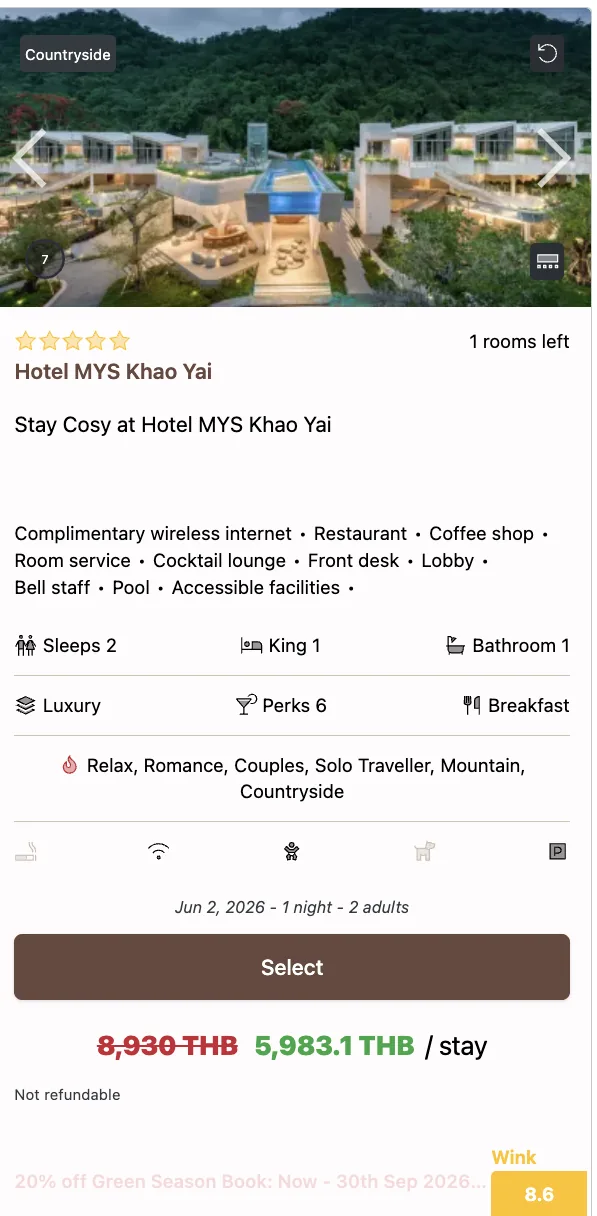
EsploraAggiungi schede prenotabili, mappe, griglie, pulsanti e moduli hotel a un sito web o superficie prodotto.
EsploraPubblica voci hotel curate sotto un unico link pubblico mobile-first.
EsploraGestisci accesso partner, canali di vendita e contesto di attribuzione per domanda guidata da partner.
EsploraL’intera gamma
Da una build API completa a un componente drop-in.
Sezione intitolata “Da una build API completa a un componente drop-in.”Vai in profondità con una completa integrazione REST + MCP — oppure, quando serve meno, inserisci un Web Component Studio: schede hotel, mappe, griglie e moduli di prenotazione. In ogni caso, Booking Engine gestisce il fulfillment sottostante.
- API REST + OAuth2 completa, server MCP ospitato e client generati
- Oppure Web Components prenotabili — schede, mappe e griglie
- 70 eventi webhook per riconciliazione in tempo reale
- Fulfillment Booking Engine sotto ogni superficie
FAQ per sviluppatori
Le domande tecniche e di prodotto più frequenti.
Esiste una pagina prodotto separata per l'accesso API?
L'accesso API sostituisce Booking Engine?
Gli assistenti AI possono usare Wink?
Posso incorporare schede hotel o mappe senza una piena integrazione API?
I gruppi alberghieri possono usare l'accesso per sviluppatori?
Da dove dovrebbero iniziare gli sviluppatori?
L'accesso per sviluppatori è aperto a tutti?
Pronto a costruire il commercio alberghiero nel tuo prodotto?
Sezione intitolata “Pronto a costruire il commercio alberghiero nel tuo prodotto?”Connetti il server MCP, leggi la documentazione, scegli la superficie di integrazione giusta. Nulla è bloccato — inizia quando il tuo prodotto è pronto a collegare la domanda hotel approvata al fulfillment Booking Engine.